Sunday, March 5, 2017
Free PHP HTML CSS JavaScript editor IDE Codelobster PHP Edition
Free PHP HTML CSS JavaScript editor IDE Codelobster PHP Edition

For valuable work on creation of sites you need a good comfortable editor necessarily. There are many requiring paid products for this purpose, but we would like to select free of charge very functional and at the same time of simple in the use editor - Codelobster PHP Edition .
- Let us consider some important possibilities and advantages of this program:
- All code highlights depending on a type, the also mixed code is thus supported, so the area of HTML will be highlighted as HTML, PHP as PHP, and Javascript as Javascript in a the same file. Thre is possibility of choice from color schemes, including popular IDEs.
- Powerful autocompletion for HTML, PHP, CSS and Javascript, including HTML5 and CSS3. For PHP the structure of project is fully recognized, and the complete list of methods falls out in the proper places.
- HTML/CSS inspector on the type of Firebug, which allows easily to correlate the selected elements of page with a code and proper style.
- Context help on all supported languages. By pressing F1 key the page with detailed description for current tag, attribute or function will be opened.
- PHP debugger. PHP debugger allows to execute PHP scripts incrementally, watching the values of all variables in every line.
- SQL manager allows to produce all necessary actions with a database - to add, delete, edit a structure and records in tables, to export data, execute SQL queries. Highlighting and auto-completion works for SQL files also.
- Support of FTP allows to work straight with a remote server and to do all necessary changes with files;
- The portable option allows to use editor without the preliminary installation.
- Other useful utilities: pair highlighting, possibility of blocks selection, collapsing, tooltips, navigation on descriptions of functions and included files at withholding of the key of CTRL, viewing of structure of files and project, preview in a browser, book-marks, and all other standard possibilities for work with a code.
Also there are special plugins for work with
- CMS: Drupal, Joomla
- PHP frameworks: CakePHP, CodeIgniter, Symfony, Yii
- JavaScript libraly: JQuery
- WordPress blogging engine
- Smarty template engine
Developer
Codelobster Software
Web Site
http://www.codelobster.com/
Language
English, Russian, German, Spanish, French, Portuguese
Supported OS
Windows 2000, Windows XP, Windows Vista, Windows 7
Download link:
- Free PHP, HTML, CSS, JavaScript editor (IDE) - Codelobster PHP Edition
Available link for download

Friday, January 13, 2017
FTP Made Easy PHP FTP Client with Code Editor Loaders and Uploaders download
FTP Made Easy PHP FTP Client with Code Editor Loaders and Uploaders download
FTP Made Easy is a complete solution for online FTP Client software. You can access your FTP location using any web browser and view, edit and delete files in the server. Also you can filter your files by file extension.
Images (jpg, png and gif) can enlarge and view like in a album.
Code Editor
Files with coding like txt, php, js, css, html are editable in the ftp client itself using easy to use code editor with color support.
FEATURES
Connect to Any FTP Server using a Web Browser
View Files and Folders
Upload Files using easy drag and drop multiple file
up loader
Popup images, edit code files like txt, php, html, js, css
with online code editor and save to FTP Server back
Download, delete files and much more…
Easy to install in your server.
Online Demo available.
Installation Guide is available.
Best Price| | Preview
DOWNLOAD FTP Made Easy - PHP FTP Client with Code Editor (Loaders and Uploaders)
Available link for download
Tuesday, November 29, 2016
FULLTEXT Indexing and Searching – MySQL PHP
FULLTEXT Indexing and Searching – MySQL PHP
In a full-text search, a search-engine-like-search examines all of the words in every stored document as it tries to match search criteria of text specified by a user.(http://en.wikipedia.org/wiki/Fulltext_search)
We have a table structure below;
peribahasa (peribahasa_entry, malay_meaning, malay_sentence_example,english_proverb, english_meaning);
One of the requirement of the is to suggest a peribahasa (Malay proverb), based on keyword(s) entered by user. The system will do fulltext search to match the keyword entered and provides result of the related proverb.
Assumed that the database contains the table peribahasa has been created with all the necessary data populated. Before implementing the search, we did an SQL command in the mySQL server (you can use phpmyadmin to facilitate this).
ALTER TABLE news ADD FULLTEXT(malay_meaning, malay_sentence);
Once you have a FULLTEXT index, you can search it using MATCH and AGAINST statements. For example:
SELECT peribahasa_entry, malay_meaning, FROM peribahasaWHERE MATCH (malay_meaning, malay_sentence_example) AGAINST (rajin);
The result of this query is automatically sorted by relevancy.
Example:
 | 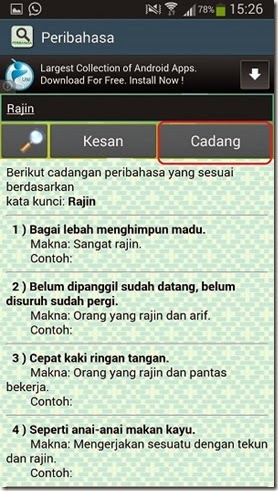 |
The complete apps are downloadable for Android ( http://bit.ly/pbahasa ) and Windows Phone ( http://bit.ly/peribahasadictionary )
Available link for download